List every presentation on your CV using this single-line format: “Presentation Title.” Event Name, City, State/Country, Month Year. Role (e.g., Invited Speaker).
That structure is the baseline every hiring committee and selection panel expects. Here is a quick checklist of the required fields for each entry:
- Presentation title — in quotation marks (or italics, if you follow a citation style like APA or Chicago)
- Event name — full conference or symposium name, not an abbreviation
- Location — city and state (domestic) or city and country (international)
- Date — Month Year (e.g., March 2024); never just a year
- Your role — Invited Speaker, Presenter, Co-presenter, Panelist, or Chair
- Status note — Invited, Contributed, Award-winning, or Selected from X submissions (when relevant)
Copyable sample entry:
“Scaling Ethical AI in Financial Services.” FinTech Summit North America, Chicago, IL, September 2024. Invited Speaker.
Pro Tip: Keep a master list with every field filled in completely. When you tailor your CV for a specific application, copy from that master list rather than reconstructing entries from memory — accuracy matters more than you think when a committee Googles your talk.
Table of Contents
- Where should presentations go on your CV?
- How to organize presentation sections with the right headings
- What to include in each entry and how to format it
- How to list co-presenters and signal your specific role
- When should you include links to slides, abstracts, or proceedings?
- Copyable sample entries for every presentation type
- How to talk about your presentations in interviews and build a quick slide deck
- The presentations worth listing — and the ones worth dropping
- Your CV presentations deserve a second set of expert eyes
- Useful sources and templates for CV presentations
Where should presentations go on your CV?
Academic CVs typically include a dedicated “Publications and Presentations” section, or separate “Publications” and “Presentations” sections, so committees can assess scholarly output at a glance. Keeping them separate from work experience is the right call for any application where your research record is being evaluated directly.
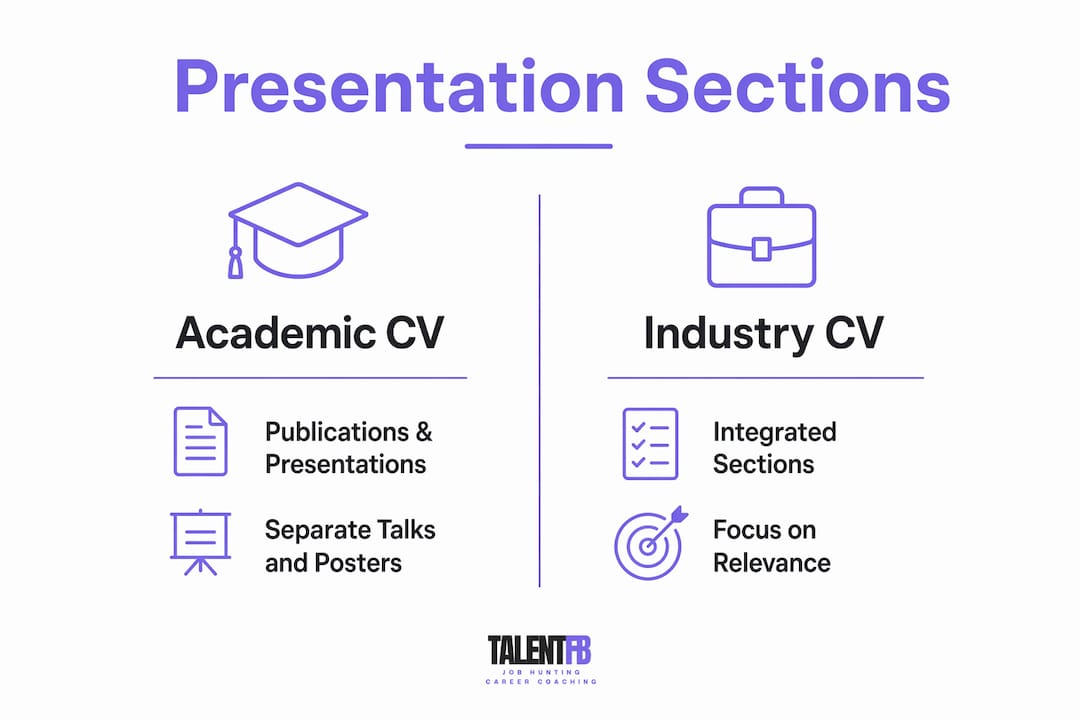
Industry CVs follow different logic. If you are applying for a Director or VP role, a hiring manager scanning your CV for 30 seconds does not need your full conference history. Pull out your two or three highest-impact talks — ideally invited ones or those with a measurable outcome — and place them in a brief “Selected Presentations” section near the bottom, after your professional experience. For a short executive CV, that section might be three lines total.

Within any presentations section, order entries in reverse chronological order — most recent first. If you have not presented in the last three years, consider whether the section earns its space on an industry CV at all.
How to organize presentation sections with the right headings
The clearest CVs use distinct subheadings to separate presentation types. Oxford University Careers Service guidance confirms that invited contributions should be highlighted separately, and that full citation-style detail is expected on academic CVs.
Here is the standard taxonomy, from highest to lowest prestige signal:
| Section heading | What belongs here |
|---|---|
| Invited Talks | Talks where you were specifically asked to present — keynotes, named lectures, departmental colloquia |
| Conference Presentations | Peer-reviewed, competitively selected oral presentations |
| Posters | Peer-reviewed poster presentations at conferences |
| Panels and Workshops | Moderated panels, workshop facilitation, roundtables |
| Media and Public Lectures | Podcast appearances, TEDx, public-facing talks |
The invited vs. contributed distinction carries real weight. An invited talk signals that your peers sought you out; a contributed talk signals that your work cleared a peer-review bar. Both matter, but conflating them in one undifferentiated list obscures that difference. If you have fewer than five total presentations, a single “Presentations” heading is fine — just note “(Invited)” or “(Contributed)” inline.
For very active researchers, a further split by topic area or research program can help committees navigate a long list. Use that approach only when you have enough entries to justify it (generally 10 or more per heading).
What to include in each entry and how to format it
Consistency is the single most important formatting principle. Pick one punctuation style and hold it across every entry. The field order recommended here follows common academic citation conventions and reads cleanly for ATS systems as well.
Field order:
- Presentation title (in “quotation marks” or italics)
- Conference or event name
- City, State or City, Country
- Month Year
- Your role
- Optional note: (Invited), (Award: Best Paper), (Selected from 240 submissions)
Formatting rules to follow:
- Use a period or middot (·) as your field separator — pick one and never mix them
- Write dates as “Month Year” (September 2024), never “9/24” or “Fall 2024”
- Spell out conference names on first use; abbreviations are acceptable only if universally recognized (e.g., NeurIPS, AAAI)
- Keep role labels consistent: “Presenter” not “Presented” — noun, not past tense
Sample entries by type:
| Type | Sample entry |
|---|---|
| Invited talk | “The Future of Decentralized Identity.” IEEE Security Symposium, San Francisco, CA, June 2023. Invited Speaker. |
| Contributed talk | “Reducing Latency in Real-Time ML Pipelines.” ACM SIGKDD, Washington, DC. Presenter. |
| Poster | “Bias Auditing Frameworks for Hiring Algorithms.” FAccT Conference, Seoul, South Korea. Poster Presenter. |
| Panel | “Women in Tech Leadership.” Web Summit, Lisbon, Portugal, November 2023. Panelist. |
For industry CVs, drop the selectivity note and the role label if space is tight. The event name and date carry enough signal.
How to list co-presenters and signal your specific role
The right approach depends on your audience. Academic committees want the full author or presenter line, in the order it appeared in the program, so they can assess your position in the collaboration. Industry recruiters care mainly that you were there and what you contributed.
For academic CVs: List all presenters in program order, then bold or underline your name.
Smith, J., Patel, A., & Nguyen, T. “Federated Learning at Scale.” NeurIPS Workshop on Privacy, New Orleans, LA, December 2023. Co-presenter.
For industry CVs: Lead with your name and use “with” for co-presenters.
“Federated Learning at Scale.” NeurIPS Workshop on Privacy, New Orleans, LA, December 2023. Co-presenter (with J. Smith, T. Nguyen).
When you chaired a session rather than presented, use “Panel Chair” or “Session Organizer” as the role label. If you organized the entire workshop, “Workshop Organizer” is the right term. These roles demonstrate leadership and are worth listing, especially for senior professionals building a C-suite profile that signals strategic influence beyond individual research output.
For large multi-institution collaborations with five or more presenters, abbreviate after the third name with “et al.” on industry CVs. On academic CVs, list everyone.
When should you include links to slides, abstracts, or proceedings?
Links add value when the reader can actually use them. A tenure-track committee reviewing your file will follow a DOI to a published proceedings paper. A grant panel may want to see your slide deck as evidence of communication quality. An industry recruiter almost never clicks through.
Include links when:
- The presentation resulted in a published proceedings paper with a stable DOI
- You are applying for a research grant and the slides demonstrate methodology
- The talk is hosted on an institutional repository, ORCID, or Zenodo with a permanent URL
- A video recording exists on a stable platform (your institution’s site, not a personal YouTube account)
Omit links when:
- The CV is for an industry role (keep it clean)
- The URL is long, unstable, or behind a paywall
- The content is confidential or proprietary
- You have more than two or three links already — too many breaks visual flow
Format any link you do include as a short, clean URL or a DOI (e.g., doi.org/10.xxxx/xxxxx). Hosting your materials on ORCID or Zenodo gives you one canonical location to maintain rather than multiple links that break over time. You can also surface selected presentation highlights on your LinkedIn profile for broader visibility outside the CV.
Pro Tip: If a recording or slide deck exists but you are not sure whether to share it publicly, write “Slides and recording available on request” at the end of the entry. It signals the material exists without forcing you to commit to a public link.
Copyable sample entries for every presentation type
Use these as direct templates. Swap in your details, adjust the role label, and you are done.
| Type | Ready-to-adapt entry |
|---|---|
| Invited talk | “Rethinking Product-Led Growth in Emerging Markets.” SaaStr Annual, San Francisco, CA, September 2024. Invited Keynote Speaker. |
| Contributed talk | “Churn Prediction Using Transformer Models.” RecSys 2023, Singapore, September. Presenter. |
| Poster | “Explainability Gaps in Credit Scoring Models.” ACM FAccT, Chicago, IL, June 2024. Poster Presenter. |
| Panel | “Building Inclusive Engineering Teams at Scale.” Grace Hopper Celebration, Orlando, FL, October 2023. Panelist. |
| Industry short entry | “AI Governance Frameworks.” World Economic Forum, Davos, Switzerland, January 2024. Invited Speaker. |
For a one-page executive CV, include at most two entries under “Selected Presentations” and choose the ones that align most directly with the role you are targeting. A keynote at a recognized industry event outweighs five contributed conference talks every time. When writing for grant panels, add the selectivity note and the DOI. When writing for executive recruiters, drop both and let the event name do the work.
How to talk about your presentations in interviews and build a quick slide deck
Your CV entry is the map; the interview is where you navigate it. Never read the entry aloud. Instead, use the Present–Past–Future framework to anchor each presentation in a narrative: what you are doing now, what the talk was about and why it mattered, and how it connects to the role you are interviewing for.
Here is a practical workflow for interview preparation:
- Select two or three entries from your CV that are most relevant to the role and prepare a one-sentence anchor for each: what the talk was, why you gave it, and what happened as a result.
- Build a one-to-two slide proof for each major presentation: slide one covers context (the problem, the audience, the event), slide two covers impact (outcome, audience size, follow-on work, or metric).
- Apply the road-sign rule to every slide. Each slide headline should make one clear claim — not summarize the slide’s contents. “Churn dropped 18% after model deployment” beats “Results.”
- For virtual interviews, position your notes within 15 degrees of your webcam so glances read as eye contact rather than screen-reading. Keep a single clean PDF of your CV ready to screen-share — never share an editable document.
- Use the thoughtful pause. A brief, deliberate silence while you glance at your notes reads as considered reflection, not hesitation. It preserves conversational authenticity.
- For in-person panels, bring three printed copies in a clean folder. It signals preparation and gives the panel a shared physical anchor for the conversation.
Pro Tip: Point the panel to the exact entry you want them to focus on: “If you look at the second entry under Invited Talks, that project is directly relevant to what you described.” It controls the conversation and shows you know your own CV cold.
The presentations worth listing — and the ones worth dropping
Here is my honest take, and I say this having seen hundreds of CVs from senior professionals who list every talk they have ever given: more is not better. A 12-entry presentations section where eight entries are contributed talks at regional conferences from eight years ago does not signal depth. It signals that you have not curated.
My recommendation is to prioritize by three criteria: recency (last five years), selectivity (invited or competitively selected), and relevance (does this talk demonstrate the leadership or domain expertise the role requires?). If an entry fails all three, cut it from the tailored version. Keep it in your master list, which you should absolutely maintain as a living document, but do not let it dilute the signal of your strongest work.
The academic-versus-industry trade-off is real. For a tenure file or a grant application, completeness is a virtue — committees want to see the full arc of your scholarly communication. For an executive CV, selectivity is the virtue. Two keynotes at recognized industry events tell a stronger story than twelve contributed talks at niche conferences.
Keep a master list of all your presentations with every field filled in — title, event, location, date, role, co-presenters, links, and any awards. Curate a subset for each application. Rehearse two or three talking points per entry before any interview. That combination of preparation and selectivity is what separates a CV that gets read from one that gets filed.
Your CV presentations deserve a second set of expert eyes
Senior professionals and academics switching to industry often underestimate how much a poorly curated presentations section costs them. The entries are all there; the framing is just wrong for the audience.
TalentFB works with Directors, VPs, and senior academics who need their CV to land in the right rooms fast. Through the JobSearch/OS™ program, Frederic Bonifassy reviews your full CV, including your presentations section, and helps you decide what to keep, what to cut, and how to frame each entry for the specific role or grant you are targeting. The typical outcome for clients is a sharper, shorter document that generates more interview requests, often within 90 days. If you are an executive or academic making a career move, book a coaching session and bring your current CV. The first review of your presentations section is part of the consultation.
Useful sources and templates for CV presentations
These are the resources worth bookmarking, whether you are building an academic CV from scratch or trimming a long presentations list for an industry application.
- MIT CAPD — Curricula Vitae — Practical academic CV guidance from MIT’s career development office; strong on structure and section organization.
- University of Pittsburgh Career Central — Listing Publications & Presentations — Clear field-by-field guidance on how to format presentation entries for both academic and industry audiences.
- Oxford University Careers Service — CVs — Authoritative guidance on academic CV conventions, including how to separate and label invited contributions.
- National Careers Service — How to Write a CV — Useful baseline for CV structure; better suited to early-career professionals than senior academics, but good for formatting fundamentals.
- TalentFB Free Resources — Templates and master-list frameworks for senior professionals maintaining a full presentations record across multiple applications.
- TalentFB — Executive CV Writing Guide — Specific guidance on condensing academic and professional output into a high-impact executive CV.
For academic CVs, start with MIT CAPD and Oxford. For industry and executive CVs, the TalentFB guides and the LinkedIn content strategy resources at The Lead Lab are more directly applicable to how senior professionals position their speaking record for visibility and career advancement.