You don’t beat an ATS by outsmarting an algorithm. You beat it by making your resume something the software can actually read and something a recruiter would actually want to keep reading. Do this right now: export your resume as a single-column, text-based file and paste it into a plain text editor to see what survives.
Run this three-point check in the next 10 minutes:
- Paste your resume into Notepad or TextEdit. If your job titles, dates, or bullets are jumbled or missing, your layout is broken.
- Scan for your top 5 required skills from the job posting. If you can’t find at least 70% of them, your keyword coverage is thin.
- Read your top three bullets out loud. If none of them include a number, you’re leaving evidence on the table.
Table of Contents
- What Does an ATS Actually Do With Your Resume?
- Parse-Safe Resume Formatting: The Rules to Fix First
- How Do You Use Keywords Without Sounding Like a Robot?
- Which File Format Should You Submit, and How Do You Test It?
- What Else Should You Do Besides Fixing Your Resume?
- Your 15-Minute Pre-Submit Checklist
- What Hiring Rooms Actually Reward
- What Should You Do This Week?
- A Faster Path if You Want One
- A Few More Places to Check Your Work
- Frequently Asked Questions
- Sources
What Does an ATS Actually Do With Your Resume?
An applicant tracking system is not a gatekeeper that rejects you outright. It’s a pipeline with three stages, and understanding each one changes how you write and format everything.
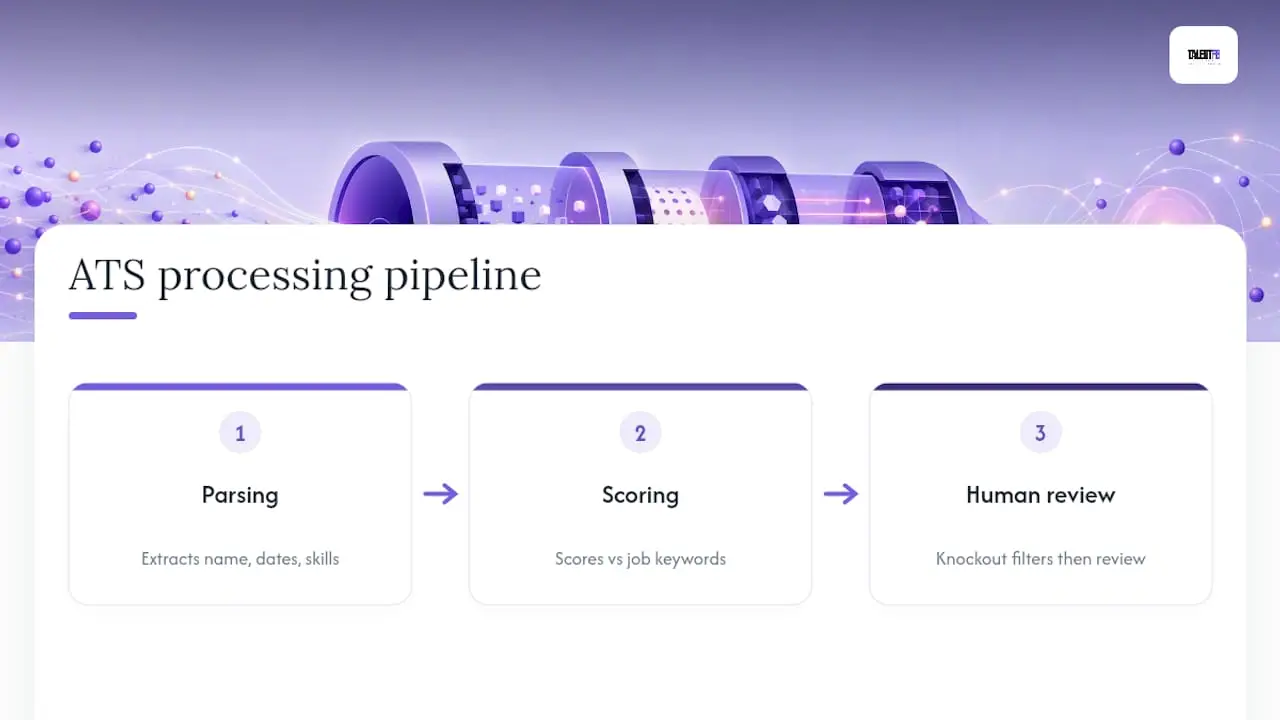
First, the parser extracts your information: name, dates, job titles, skills, and bullet content, then maps it into database fields. If your layout confuses the parser, your work history and MBA might land in the wrong fields or vanish entirely. Second, the system scores that extracted content against the job description’s required keywords. You don’t need a perfect match. Aim for roughly 70% or more of the required keywords rather than chasing every single term, since modern systems rank candidates instead of issuing flat rejections.

Third, and this is the part people forget, a human recruiter still opens the top-ranked resumes. Knockout questions on the application form (visa status, required certifications, salary expectations) often filter candidates before a recruiter even looks. Beating the parser gets you in the pool. It doesn’t guarantee the interview.
Parse-Safe Resume Formatting: The Rules to Fix First
Formatting is where most senior professionals lose ground, usually because a beautifully designed template is quietly unreadable to a parser. Parse hygiene comes before anything else: if the system can’t read your file, your carefully chosen keywords never even get counted.
Here’s what to fix, in order:
- Use a single-column, reverse-chronological layout. Two-column resumes and sidebars confuse parsers into reading across columns instead of down them, scrambling your work history.
- Stick to standard section headings. Use “Experience,” “Education,” and “Skills” instead of creative alternatives like “My Journey” or “Where I’ve Been.” Parsers look for recognized labels.
- Put your contact information in the body of the document, not the header or footer. Many parsers skip headers and footers entirely, which means your phone number and email disappear.
- Use consistent date formats throughout (e.g., “Jan 2022 to Present”), and choose simple bullet characters like round dots instead of custom icons or symbols.
- Cut tables, text boxes, images, and decorative fonts. These frequently break during extraction, even when they look sharp in Word or Canva.
Designer templates have their place. They work well for a portfolio site, a LinkedIn featured document, or a printed copy you hand someone at a conference. But for anything going through an online portal, keep a separate, ATS-safe version on hand. I’ve watched candidates lose weeks wondering why they never heard back, only to discover their two-column template had scattered their last three job titles into the wrong sections.
How Do You Use Keywords Without Sounding Like a Robot?
Keyword strategy is where honesty and optimization actually work together, not against each other. Start by translating your internal job title into market language. If your company calls you a “Level 6 Technical Lead” but the market calls that role a “Senior Engineering Manager,” write it as “Level 6 Technical Lead (Senior Engineering Manager)” so both the parser and the recruiter recognize you.
From there, list 5 to 8 hard skills in your Skills section, and use every one of them in at least one bullet point tied to a result or scope. A skill sitting alone in a list convinces no one. A skill embedded in a sentence with a number behind it convinces everyone.
- Weak: “Skills: Python, SQL, Data Analysis, Leadership, Stakeholder Management”
- Strong: “Led a team of 6 engineers using Python and SQL to rebuild the reporting pipeline, cutting analysis time by 40%”
Aim for that 70%+ keyword coverage target, and resist the urge to paste the entire job description into your Skills section. That trick reads as noise to both the algorithm and the human who eventually opens your file. Tailoring your resume to the specific job description means pulling the 5 or 6 terms that matter most, not every term that appears.
Pro Tip: Highlight the job description in one color and your resume in another, then check for overlap. If your resume is a different color everywhere except your Skills section, you’re stuffing, not tailoring.
Which File Format Should You Submit, and How Do You Test It?
Follow the portal’s explicit instructions first. If it asks for DOCX, submit DOCX.
- Check the upload requirements. A text-based PDF exported directly from Word is acceptable when PDF is requested, but an image-based PDF or a scanned copy will fail every time.
- Run the plain-text test. Copy your entire resume and paste it into a plain text editor. Confirm your job titles, dates, and bullets appear in the correct order with nothing missing.
- Use a free ATS preview or parser tool to catch issues you missed, then fix the specific section it flags rather than rebuilding the whole document.
What Else Should You Do Besides Fixing Your Resume?
A perfectly optimized resume submitted into a portal with zero context still competes against hundreds of other applicants. Referrals and direct outreach change your odds far more than another round of resume tweaks.
- Ask a former colleague or connection at the target company to submit you as an employee referral. This routes you around some automated filters entirely.
- Send a short, specific note to the hiring manager or recruiter: mention the role, one relevant result, and ask for 10 minutes. Do this a day or two after you apply, not instead of applying.
- Apply only where you clearly meet the core knockout requirements (location, visa status, years of experience). Ten well-matched applications beat fifty scattershot ones.
Understanding how ATS fits into the broader hiring funnel helps you see why referrals matter so much: recruiters trust a warm introduction more than any keyword match.
Your 15-Minute Pre-Submit Checklist
Before you hit submit, run through this list. It takes less time than writing one more cover letter paragraph.
- Plain-text test passed: titles, dates, and bullets appear in order.
- Keyword audit done: 70%+ of required terms present, in Skills and in bullets.
- Knockout questions answered honestly: visa, location, certifications.
- File format matches the portal’s request (DOCX or text-based PDF).
- Six-second skim test: could a recruiter get your seniority and impact from a glance?
Recruiters often skim resumes for roughly six seconds before deciding whether to read further, which is exactly why every bullet needs a number, not just a description. Try these templates:
- “Directed a $12M product roadmap across 3 markets, growing revenue 22% year over year.”
- “Rebuilt the onboarding process for a team of 40, cutting ramp time from 90 to 45 days.”
- “Negotiated vendor contracts saving $500K annually while maintaining service levels.”
What Hiring Rooms Actually Reward
Fifteen years of sitting on the hiring side taught me one durable lesson: recruiters and hiring managers forgive an imperfect keyword match far more easily than they forgive a resume they can’t quickly understand. The order of operations matters. Fix parsing first, align keywords second, and only then polish your bullets for recruiter impact. Skipping straight to keyword stuffing without fixing the layout is like decorating a house with no foundation.
The candidates who get callbacks aren’t the ones who gamed the system. They’re the ones who made it effortless for a tired recruiter, three coffees in on a Tuesday, to see exactly why they belong in the next round.
Title translation, honest knockout answers, and writing for a six-second skim are the three habits that separate resumes that get opened from resumes that get buried. Coaching results across the professionals TalentFB has worked with consistently trace back to these fundamentals done well, not to any clever trick.
What Should You Do This Week?
If I had one week and one resume, I’d run the plain-text test first, then audit my bullets against a real job description for keyword gaps, then send one honest referral request to someone in my network. That order matters more than any single tip in this guide.
If you’re aiming for a director-level or VP transition and need it to move faster, that’s usually when coaching earns its cost. Either way, you’ve got a solid starting point now.
A Faster Path if You Want One
DIY fixes will get your resume parsed correctly and noticed more often, and that’s genuinely worth doing regardless of what you decide next. But if you’re a senior tech professional aiming for a director, VP, or C-suite move, the resume is only one lever.
This isn’t for entry-level job seekers or anyone happy to keep tweaking a resume alone. It’s for professionals who’ve decided their next move needs to happen faster and land higher. If that’s you, take a look at the Job Search masterclass and see whether the structured, coached approach fits where you’re headed next.
A Few More Places to Check Your Work
- UIC Career Services on beating the ATS for a university-level view on pairing resume fixes with networking.
- Coursera’s ATS guide for context on applicant volume and recruiter behavior.
- TryApplyNow’s layout breakdown for a deeper look at which templates actually parse cleanly.
- Easy CV’s tailoring guide for step-by-step keyword extraction from any job posting.
Frequently Asked Questions
Does formatting really matter more than keywords?
Yes, in the sense that broken formatting comes first. If a parser can’t read your dates or job titles, no amount of keyword matching will help, since that content never reaches the scoring stage.
How many keywords do I actually need to include?
Aim for roughly 70% or more of the required keywords from the job description, placed naturally in your Skills section and your bullets rather than crammed into a single list.
Is a PDF safe to submit, or should I always use Word?
Use whatever format the portal requests. When PDF is required, export a text-based PDF directly from Word rather than a scanned or image-based version, which most parsers cannot read at all.
Can I bypass ATS entirely by using a referral?
A referral doesn’t remove the ATS from the process, but it often gets a recruiter to pull your resume for a manual look regardless of your automated ranking, which is a meaningfully different path into the interview stage.
How do senior professionals handle internal job titles that don’t match the market?
Put the market-equivalent title first or add it in parentheses next to your internal title on the first line of that role, so both the parser and the recruiter immediately understand your level.
Sources
- How to Beat an ATS System Without Keyword Stuffing
- ATS-Friendly Resume Format Guide (2026) | ATS Verification
- How to Get Past ATS Filters: End-to-End Playbook (2026)