TL;DR:
- LinkedIn is fundamentally a social media platform designed around professional networking and relationship building. Its core features—profiles, connections, content feeds, and engagement tools—align with traditional social media mechanics, but with a focus on career growth. Professionals who actively contribute, maintain consistent engagement, and employ strategic networking tactics can maximize its potential for career advancement.
Most professionals have asked themselves at some point whether LinkedIn truly qualifies as social media. The question matters more than it seems. If you treat LinkedIn like a job board, you will use it wrong. If you treat it like Facebook, you will also use it wrong. The reality is that LinkedIn is social media, but it operates with a professional context that changes everything about how you should show up there. Understanding this distinction is what separates professionals who quietly collect connections from those who actually build careers on the platform.
Table of Contents
- Is LinkedIn a social media platform?
- How LinkedIn differs from other social platforms
- How people actually use LinkedIn’s social features
- Common misconceptions about LinkedIn as a social network
- Strategies to maximize LinkedIn for career advancement
- My honest take on LinkedIn as a professional tool
- Take your LinkedIn presence further with Talentfb
- FAQ
Is LinkedIn a social media platform?
Yes, without question. The confusion often comes from LinkedIn’s professional tone, but tone does not change structure. Social media, at its core, is defined by a few consistent characteristics: user-created profiles, the ability to connect with others, content feeds where posts are shared and engaged with, and community-driven interaction. LinkedIn checks every one of those boxes.
Here is how LinkedIn’s features map directly to the accepted definition of a social media platform:
- User profiles: Members create detailed profiles showcasing their career history, skills, and accomplishments, serving as a professional identity online.
- Connection system: You send and accept connections, follow thought leaders, and build a network much like you would on any other social platform.
- Content feed: LinkedIn surfaces posts, articles, shared updates, and recommended content in a personalized feed powered by engagement signals.
- Engagement tools: Likes, comments, reposts, and reactions mirror the interaction mechanics of every major social network.
- Messaging: Direct messaging and group conversations create private social interaction alongside public content.
“LinkedIn is the world’s largest professional network on the internet,” and it uses the same core social media mechanics to build relationships and share ideas that define platforms like Facebook or X. The difference is purpose, not structure.
What makes LinkedIn a social media platform is not just what it looks like, but what it does: it connects people, amplifies ideas, and builds communities. The professional wrapper around those functions is a design choice, not a departure from social media altogether.
How LinkedIn differs from other social platforms
Understanding LinkedIn as a LinkedIn social platform means recognizing where it diverges from entertainment-first networks. The gap is significant, and it shapes everything from the content you post to the connections you pursue.
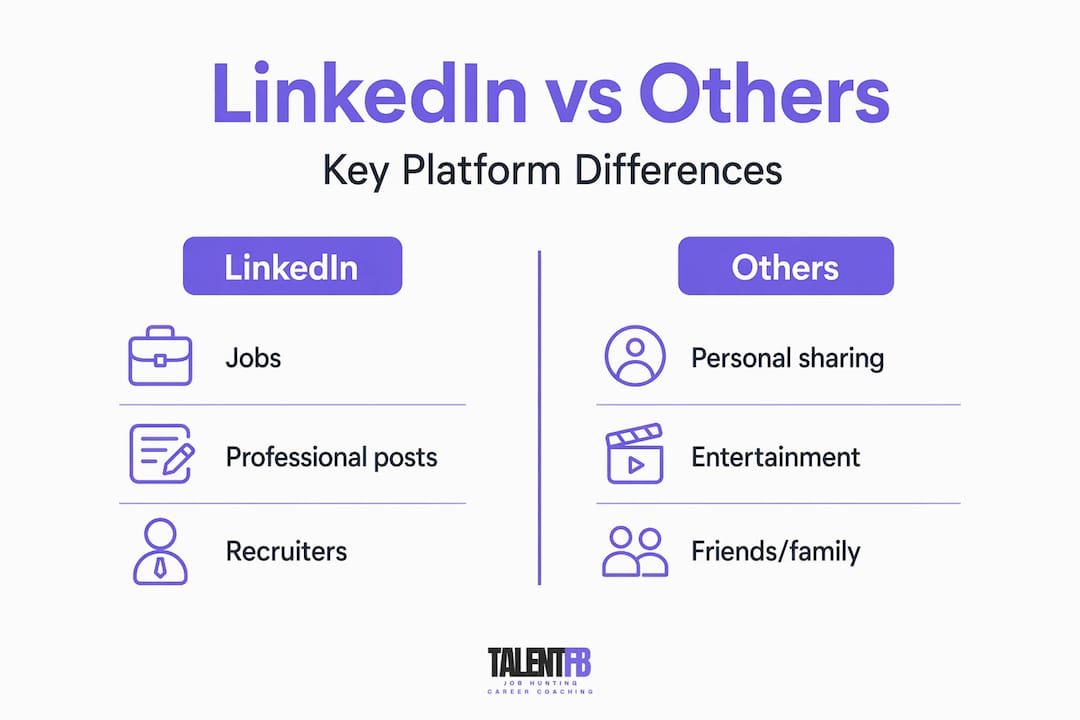
| Feature | Facebook / Instagram / TikTok | |
|---|---|---|
| Primary purpose | Career growth and professional networking | Entertainment, personal connection, lifestyle |
| Content tone | Industry insights, career updates, thought leadership | Personal posts, humor, visual trends |
| Audience intent | Career development, hiring, B2B relationships | Social interaction, entertainment consumption |
| Job search tools | Built-in job listings, recruiter activity, applications | Minimal or absent |
| Feed personalization | AI-driven professional relevance | Interest-based and social graph |
LinkedIn integrates job listings and recruiter activity as core social features, which no other mainstream social platform does at scale. A recruiter scrolling LinkedIn is not browsing casually. They are actively sourcing talent. That changes what a “good post” looks like and why your profile needs to work harder than a typical social media bio.
LinkedIn also uses AI to power its feed in a way that is specific to professional identity. The platform analyzes your behavior over time, weighing what content you engage with, what jobs you view, and what skills your network holds. AI feed models actually predict how your professional identity is likely to evolve and surface content aligned with that trajectory. That is far more sophisticated than an entertainment algorithm chasing your attention.
Pro Tip: If you are a senior technology professional, make sure your LinkedIn headline speaks to the role you want next, not just the role you hold now. The AI reads intent, and so do recruiters.
How people actually use LinkedIn’s social features
Knowing what LinkedIn is only gets you so far. What separates professionals who generate real career momentum is knowing how to use LinkedIn’s social mechanics with intention.
Here is a practical breakdown of how to put LinkedIn’s social features to work:
-
Optimize your profile as your professional home base. Your profile is not a static resume. It is a living document that signals your expertise and invites connection. A complete profile with a strong headline, rich summary, and endorsements gets significantly more visibility in search and recruiter feeds.
-
Post content that reflects your expertise. Sharing industry insights, career lessons, or perspectives on trends in your field positions you as a credible voice. You do not need to post daily. Posting two to three times per week with genuine substance is far more effective than daily noise.
-
Comment with substance, not pleasantries. Commenting “Great post!” adds nothing. Commenting with a counterpoint, a relevant experience, or a follow-up question gets you noticed by the poster’s entire network, many of whom may not know you yet. This is one of LinkedIn’s most underused social growth mechanisms.
-
Use LinkedIn groups and events strategically. Groups focused on your industry or function are spaces where peer conversations happen away from the main feed. LinkedIn’s emerging creator events and live formats offer new ways to participate in professional communities and build recognition at scale.
-
Build connections with purpose. Sending a personalized note with every connection request has a dramatically higher acceptance rate than clicking “Connect” cold. One sentence about why you want to connect is enough. It signals that you are networking intentionally, not collecting contacts.
Pro Tip: After attending a LinkedIn Live event or virtual conference, connect with the attendees who asked insightful questions. Those are the people actively investing in their careers, and they are exactly who you want in your network.
Common misconceptions about LinkedIn as a social network
Several persistent misconceptions cause professionals to either underuse LinkedIn or use it in ways that actively work against them. It is worth naming them plainly.
-
“LinkedIn isn’t really social media because it’s career-focused.” This is the most common misreading. Thematic social platforms, those built around a specific context like careers, health, or sports, fully qualify as social media. LinkedIn’s professional focus is a theme, not a disqualifier.
-
“I only need LinkedIn when I’m job hunting.” Sporadic use is one of the biggest mistakes professionals make. LinkedIn’s AI weights sustained engagement patterns over single interactions. If you disappear for six months and suddenly start posting when you need a job, the algorithm barely recognizes you. Consistent, low-effort activity throughout the year keeps you visible when it counts.
-
“Posting about personal life is unprofessional on LinkedIn.” This is actually shifting. Professional vulnerability, sharing what you learned from a failure, or how a career pivot felt, performs well on LinkedIn because it is relatable and human. The line to avoid is posting the kind of content that belongs on Instagram or TikTok. Career-relevant personal stories work. Vacation photos do not.
-
“More connections always mean more visibility.” A tightly curated network of relevant professionals who engage with your content outperforms thousands of disconnected contacts. Profile completeness and active network engagement feed directly into LinkedIn’s recommendation scoring, not just raw connection count.
The professionals who get LinkedIn right treat it as a relationship platform. They show up consistently, contribute meaningfully, and think in terms of long-term visibility rather than short-term transactions.
Strategies to maximize LinkedIn for career advancement
If you are ready to use LinkedIn as the professional social platform it truly is, here is where to focus your energy:
-
Complete your profile to “All-Star” status. LinkedIn’s own data shows that complete profiles get significantly more profile views and connection requests. This means a professional photo, a compelling headline, a detailed summary, and at least five listed skills with endorsements. Think of your profile as your digital handshake. LinkedIn networking advantages for senior professionals are directly tied to how credible that handshake feels.
-
Engage before you post. Spend ten minutes each morning commenting on posts in your feed before you share anything of your own. This warms up the algorithm and puts your name in front of new audiences before you even need them to notice your content.
-
Use LinkedIn’s job tools actively, not passively. Set up job alerts, use the “Open to Work” signal (it can be kept visible only to recruiters if you prefer discretion), and research companies before applying. LinkedIn’s role in recruitment for senior tech careers goes far beyond job listings. Recruiters research your activity history before reaching out.
-
Experiment with LinkedIn newsletters and articles. Long-form content positions you as a subject matter expert and is indexed by Google, extending your reach well beyond LinkedIn itself. A monthly newsletter on your area of expertise compounds over time.
-
Track and update your profile regularly. LinkedIn’s AI continuously reassesses your professional identity based on your activity and profile updates. Updating your LinkedIn profile in 2026 is not a one-time task. Each update signals relevance to both the algorithm and the recruiters who watch it.
Pro Tip: Turn on “Creator Mode” in your LinkedIn settings. It shifts your profile layout to highlight your content and adds a “Follow” button, which dramatically widens your reach beyond your first-degree connections.
My honest take on LinkedIn as a professional tool
I have worked with hundreds of senior professionals navigating career transitions, and I notice the same pattern repeatedly. The people who struggle with LinkedIn are not struggling because the platform is ineffective. They are struggling because they treat it like a bulletin board rather than a conversation.
What I have learned is that LinkedIn rewards generosity. The professionals who add value to other people’s posts, who share what they know without holding back, who show up even when they are not actively looking for a job, those are the ones who have opportunities come to them. The platform is genuinely social in that way. It reflects back what you put into it.
My honest opinion? Most professionals dramatically underestimate what LinkedIn can do for them. The platform’s sustained engagement patterns matter more than any single viral post. I tell every senior professional I work with: treat LinkedIn like the most important relationship in your professional toolkit, because in many ways, it is. The doors it can open are real, but they open for people who knock consistently, not just when they are desperate.
The future of LinkedIn points toward even more interactive formats, from gated creator events to professional education tools. That trajectory means the professionals who build their presence now will have a significant head start when those features fully mature.
— Frederic
Take your LinkedIn presence further with Talentfb
If this article has shifted how you see LinkedIn, the next step is putting that understanding into practice with a structured approach. At Talentfb, we work specifically with senior technology professionals who want to stop hoping LinkedIn will work and start making it work.
Our AI Job Search Masterclass walks you through profile optimization, targeted outreach, and content strategies designed to get you in front of the right people within 90 days. We also offer the AI Job Search Playbook, a practical resource that combines LinkedIn branding with AI-driven job search techniques that senior professionals are using right now to land leadership roles. If you are serious about your next career move, these are the tools that give you an edge.
FAQ
Is LinkedIn considered a social media platform?
Yes. LinkedIn meets the core definition of social media: it features user profiles, a connection system, a content feed, and engagement tools. It is best described as a professional social media platform because its design and intent center on career growth rather than entertainment.
What is the difference between LinkedIn and Facebook?
LinkedIn is built for professional networking, career development, and job searching, while Facebook centers on personal connection and entertainment. LinkedIn’s feed is driven by professional relevance and AI modeling of career identity, whereas Facebook prioritizes personal relationships and interest-based content.
What is LinkedIn primarily used for?
LinkedIn is used for professional networking, job searching, recruiter outreach, industry knowledge sharing, and career branding. It also functions as a content publishing platform where professionals build thought leadership in their fields.
Does LinkedIn use social media algorithms like other platforms?
Yes. LinkedIn uses AI-driven feed relevance that analyzes user behavior over time to surface professional content aligned with each member’s career identity and development goals. Consistent activity on the platform directly improves how often your content is shown.
Is LinkedIn effective for job searching in 2026?
Absolutely. LinkedIn remains the primary tool recruiters use to source and vet senior professionals. With creator events and live formats expanding the platform’s networking capabilities, its value for career advancement continues to grow well beyond a simple job board.