Yes, you should contact a hiring manager directly in most cases. The one exception: if the job posting explicitly says “no emails” or “no phone calls,” respect that instruction without question. Otherwise, reaching out is one of the smartest moves you can make to separate yourself from the stack of applications sitting in an ATS.
Here is your three-step action plan you can run right now:
- Submit your application through the official portal first.
- Identify the hiring manager’s name and email (methods below).
- Send a 3–5 sentence email within 24–48 hours of applying.
Your subject line formula: [Role] — [Key Metric/Achievement] — [Context]
Example: VP of Engineering — Scaled platform to 10M users — Re: your open CTO role
Immediate dos before you hit send:
- Keep the message under 5 sentences, no exceptions.
- Reference one specific company initiative or challenge you’ve researched.
- Attach your resume as a PDF named
Lastname_Role.pdffor easy filing. - If you have a referral, mention that person’s name in the subject line and the opening sentence.
Table of Contents
- How do you find a hiring manager’s name and email?
- Three copy-ready outreach templates that actually get replies
- When you must not contact a hiring manager
- How and when should you follow up after reaching out?
- Email, LinkedIn, or phone: which channel fits your situation?
- Common mistakes that get your outreach ignored
- Four research-backed tactics that increase hiring manager replies
- What 15 years in the hiring room taught me about outreach
- How TalentFB accelerates your outreach and response rates
- Useful tools and resources for finding and verifying contacts
- Sources
How do you find a hiring manager’s name and email?
The fastest path is usually right in front of you. Work through these methods in order, and you will find the right contact for the vast majority of roles, as Indeed’s hiring manager research confirms.
- Read the job posting carefully. Many postings name the hiring manager or the team lead. Check the “About the team” section.
- Visit the company’s About or Team page. Engineering, Product, and Sales teams often list department heads by name.
- Search LinkedIn. Type the company name plus the likely title (“Director of Product,” “VP Engineering”) in the People filter. Cross-reference the posting’s department.
- Look at team members’ email addresses. If you know one colleague’s email format (say,
j.smith@company.com), you can model the hiring manager’s address using the same pattern. - Call the company reception. A polite, direct ask (“Could you tell me who leads the [X] team?”) works more often than people expect, especially at mid-size companies.
Tools that speed up email verification:
- LinkedIn Sales Navigator: Filters by seniority, function, and company to pinpoint the right person quickly.
- Hunter: Finds and verifies professional email addresses by domain. The free tier covers a meaningful number of monthly searches.
- RocketReach: Returns verified emails and direct dials, particularly strong for U.S.-based tech companies.
- Google queries: Try
site:linkedin.com/in "[Company Name]" "VP Engineering"or"@company.com" "hiring manager"to surface public profiles.
Pro Tip: Once you model a likely email address from a coworker’s format, run it through Hunter.io’s email verifier before sending. A bounced email wastes your shot and flags you as unprepared.
Avoid reaching out through personal platforms like Facebook or Instagram. Those channels signal poor professional judgment, and most hiring managers find it intrusive.
Three copy-ready outreach templates that actually get replies
Subject lines live or die by specificity. Generic subjects like “Interested in your open role” get skipped. The formula that works: Role + Metric + Context, kept under 10 words.
Subject line examples:
- Head of Data — Reduced pipeline latency 40% — Re: your JD
- Referred by Sarah Chen — Senior PM role — Acme Corp
- Director of Engineering — Led 3 platform migrations — Application submitted
Template 1: After applying through the ATS
Subject: [Role] — [Key Metric] — Application submitted
Hi [Name],
I applied for the [Role] position this morning through your careers portal. I’ve spent the last four years leading [specific function] at [Company], where I [quantified result tied to a job requirement]. I noticed your team is [specific company initiative or challenge], and I’d welcome a 15-minute call to share how I’ve approached that exact problem. Happy to work around your schedule.
Best,
[Your Name]
[LinkedIn URL]
Template 2: When you have a referral
Subject: Referred by [Referrer Name] — [Role] — [Key Metric]
Hi [Name],
[Referrer Name] suggested I reach out directly. I applied for the [Role] position and wanted to add context: at [Previous Company], I [quantified achievement relevant to the role]. Given what [Referrer Name] told me about your team’s current priorities, I believe there’s a strong fit worth a quick conversation. Would a 15-minute call this week work for you?
Best,
[Your Name]
Mention the referral immediately, as ZapResume’s outreach research confirms: a warm introduction is the highest-converting opener you have.
Template 3: Cold reach with no referral
Subject: [Role] — [Key Metric] — [Company Name]
Hi [Name],
I came across the [Role] opening and wanted to reach out before my application gets buried. I’ve spent [X years] solving [specific problem] in [industry], most recently delivering [quantified result]. I see your team is focused on [company initiative], and I have a specific approach to that challenge I’d love to share briefly. Are you open to a quick 10-minute call?
Best,
[Your Name]
Attachment tip: Always name your file Lastname_Role.pdf. Hiring managers file dozens of resumes weekly; a clearly named PDF is easier to find and forward than Resume_Final_v3.pdf.
Dos and don’ts:
- Do lead with one concrete result, not a career summary.
- Do make the ask specific and low-effort (“10-minute call” beats “let me know if you’d like to connect”).
- Don’t ask for a job outright in the first message.
- Don’t write more than 5 sentences. If you need more, you haven’t edited enough.
When you must not contact a hiring manager
Some situations call for restraint, and reading them correctly protects your professional reputation.
- The job posting says “no emails” or “no phone calls.” This is a hard stop. Ignoring explicit instructions is one of the fastest ways to get flagged as a candidate who doesn’t follow directions, per Indeed’s direct outreach guidance.
- The company uses a formal internal referral process. If a colleague is submitting your name through HR, let that process run before you add an unsolicited email.
- You’ve already received a rejection. Contacting the hiring manager after a formal rejection rarely reverses the decision and often leaves a negative impression.
- The only contact you can find is a personal social account. Facebook, Instagram, and personal Twitter accounts are off-limits.
Polite alternative when direct contact is forbidden:
Apply through the ATS, then send a LinkedIn connection request with a one-line note:
That’s it. No pitch, no ask. It plants a name in their memory without crossing a boundary.
How and when should you follow up after reaching out?
Timing and restraint are everything here. The cadence that works without damaging your reputation:
- Initial outreach: within 24–48 hours of submitting your application.
- First follow-up: 5–7 business days after your initial email, if no response.
- Second follow-up: 7–10 business days after the first follow-up, only if the role is still actively posted.
Follow-up template 1 (brief reminder):
Subject: Following up — [Role] — [Your Name]
Hi [Name], I wanted to follow up on my note from [date]. I remain very interested in the [Role] position and happy to share any additional context. Please let me know if a quick call would be useful.
Follow-up template 2 (alternate channel offer):
Hi [Name], I realize email may not be the easiest channel right now. If a 10-minute call works better, I’m flexible on timing this week. Either way, I’m still very interested in the [Role] and would love to connect.
When to stop:
- You’ve sent two messages with no response.
- You received an explicit rejection or a “we’ll keep your profile on file” reply.
- The role has been removed from the company’s careers page.
A short follow-up can lift reply rates meaningfully, but additional messages have diminishing returns and risk damaging your professional brand, as Indeed’s research on outreach cadence makes clear.
Email, LinkedIn, or phone: which channel fits your situation?
The right channel depends on role seniority, company size, and what the job posting signals.

Email is the preferred channel for senior roles (Director and above) when you’ve verified the address. It’s formal, searchable, and easy to forward internally. Use it whenever you can confirm the address with Hunter.io or RocketReach.
LinkedIn works well for warm introductions or when you genuinely cannot find a verified email. A dual-channel approach, where you send a brief LinkedIn connection note first and follow with an email, tends to perform well for mid-level roles. For senior tech roles, LinkedIn alone often feels too casual.
Phone is appropriate only when the job posting or company culture explicitly signals it’s welcome, or for small local companies where a direct call to reception is standard practice. Cold-calling a hiring manager’s direct line without any prior contact is rarely well-received in corporate environments.
Sample LinkedIn connection note:
Keep it to two sentences. The goal is a warm connection, not a pitch.
Common mistakes that get your outreach ignored
Most outreach fails for predictable reasons. Here’s what hiring managers notice immediately, and how to fix each one.
- Ignoring “no contact” instructions. Signals you don’t read carefully. Fix: always check the full job description before reaching out.
- Sending a long, generic message. A wall of text about your career history reads as a cover letter, not a targeted note. Fix: cut to 5 sentences maximum, lead with one specific result.
- Multiple rapid follow-ups. Two emails in three days reads as pressure, not enthusiasm. Fix: wait 5–7 business days between messages.
- Contacting on personal social channels. Fix: limit outreach to professional email and LinkedIn only.
- Asking for a job outright. “I’d love to be considered for this role” in a cold email puts the hiring manager in an awkward position. Fix: ask for a conversation, not a decision.
Pre-send checklist:
- [ ] Message is 5 sentences or fewer.
- [ ] Subject line follows the Role + Metric + Context formula.
- [ ] You reference one specific company initiative or challenge.
- [ ] Resume is attached as
Lastname_Role.pdf. - [ ] You are not contacting through a personal social channel.
- [ ] The job posting does not say “no emails” or “no phone calls.”
Four research-backed tactics that increase hiring manager replies
These aren’t hunches. They come from consistent patterns across thousands of applications and are reinforced by TalentFB’s work with 350+ senior tech professionals.
Tactic 1: Send outreach the same day or next morning after applying. When your email arrives while your ATS application is still fresh in the system, the hiring manager can cross-reference both in one sitting. JobRush’s outreach sequencing research recommends identifying target roles posted in the last 48 hours, submitting through the portal, then sending your tailored note the same day or next morning.
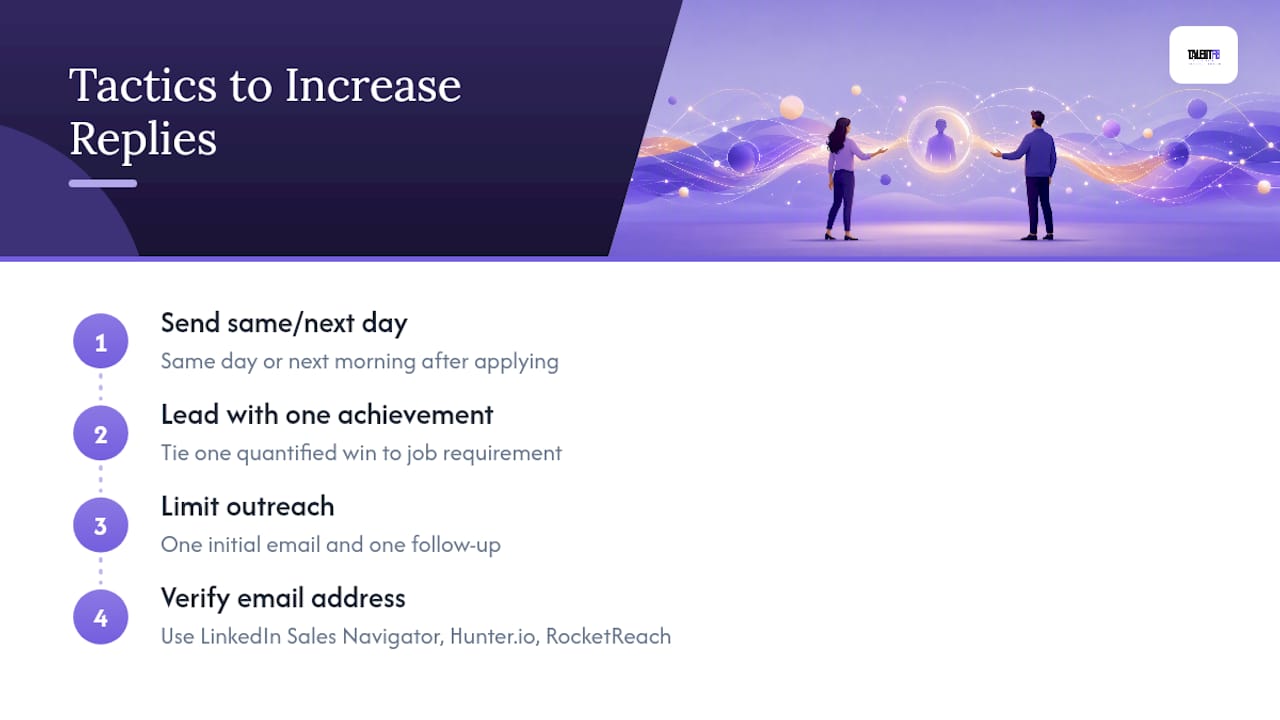
Tactic 2: Lead with one quantified achievement tied to a specific job requirement. Hiring managers respond to candidates who frame themselves as problem solvers, not job seekers.
Tactic 3: Cap your outreach at one initial email and one follow-up. A single well-timed follow-up can lift reply rates meaningfully. Beyond that, additional messages have sharply diminishing returns and risk leaving a negative impression with the very person you’re trying to impress.
Tactic 4: Verify email addresses before sending. Use LinkedIn Sales Navigator to identify the right person, Hunter.io or RocketReach to surface and verify the address, and model the format from a known coworker’s email if the tools return nothing.
Statistic to keep in mind: According to Indeed’s hiring manager outreach research, a tailored message that positions you as a peer-level problem solver who understands the team’s context is meaningfully more likely to earn a response than a generic job-seeking note.
Pro Tip: At TalentFB, we coach senior tech clients to script a 30-second value pitch before writing a single word of their outreach email. The pitch answers three questions: What specific problem do I solve? What’s my best proof point? Why this company, right now? When you can answer all three in 30 seconds, the 5-sentence email writes itself.
For a deeper look at how senior tech professionals structure targeted outreach, the candidate attraction strategy for senior tech pros covers message frameworks and role-specific examples worth bookmarking.
What 15 years in the hiring room taught me about outreach
The pattern that surprised me most, after sitting on the hiring side for 15 years across tech, fintech, and adtech, is how rarely candidates write like peers. Most outreach reads like a cover letter: formal, self-focused, and asking for something. The messages that actually got my attention were the ones that felt like a colleague had spotted a problem I was dealing with and wanted to talk about it.
One example stays with me. A candidate reached out for a senior engineering role with a two-paragraph email. The second paragraph read: “I noticed your platform recently expanded into Southeast Asia. I led a similar regional scale-up at [Company] and ran into the exact latency and compliance issues you’re likely facing. Happy to share what worked.” That’s it. No ask for a job. Just a peer offering a relevant perspective. We scheduled a call the next morning.
My honest recommendation: write your outreach email as if you’re reaching out to a colleague you respect, not a gatekeeper you need to impress. Be specific, be brief, and make the ask easy to say yes to. Professional persistence is a strength; just pair it with genuine respect for the other person’s time and boundaries. For more on building the kind of executive presence that makes this outreach land, Borko Kovačević’s founder and operator perspective offers a grounded take on leadership-level communication worth reading.
How TalentFB accelerates your outreach and response rates
Senior tech professionals who work with TalentFB don’t spend weeks guessing at email formats or rewriting templates from scratch. The AI Job Search Playbook gives you a structured, proven system to identify the right hiring managers, craft outreach that positions you as a peer-level problem solver, and follow up with precision.
Here’s what the coaching covers for direct outreach:
- Outreach scripting: We build your 30-second value pitch and translate it into a 5-sentence email template tailored to your target roles and seniority level, so every message you send is specific and ready to go.
- Verified contact research: We walk you through the exact LinkedIn Sales Navigator, Hunter.io, and RocketReach workflow to find and verify hiring manager emails, so you’re never sending into a void.
- LinkedIn profile optimization: Your profile needs to hold up the moment a hiring manager clicks your name. We optimize your LinkedIn presence so it reinforces every outreach message you send.
If you’re a Director, VP, or Senior Manager in tech ready to land your next role within 90 days, the career coaching guide for tech executives is the right starting point. Book a discovery call and we’ll map out your outreach strategy in the first session.
Useful tools and resources for finding and verifying contacts
A short reference list of the tools mentioned throughout this article, with one practical note on each:
- LinkedIn and LinkedIn Sales Navigator: Use the free version for basic people search; Sales Navigator for filtered searches by seniority, function, and company size. Best for identifying the right person before you find their email.
- Hunter: Domain search returns all publicly indexed email addresses at a company, plus a confidence score. Run every modeled address through the built-in verifier before sending.
- RocketReach: Strong for U.S. tech companies; returns verified emails and sometimes direct dials. Paid plans offer higher monthly lookup volumes.
- Dearhiringmanager: A contact-finder tool that can surface likely hiring managers and verified emails quickly for many postings. Useful when LinkedIn and Hunter.io return nothing.
- TalentFB free resources: Templates, outreach checklists, and tracking tools you can download to manage your outreach pipeline and follow-up cadence.
Verification best practice: Never send to a modeled email address without running it through a verifier first. A hard bounce on your first message to a hiring manager is a poor first impression that you cannot walk back.
Sources
- Indeed
- 10 Ways to Find the Name of a Hiring Manager (With Examples) – Indeed
- How To Email a Hiring Manager in 2026: Templates, Subject Lines, and 10 Sample Emails | ZapResume
- How to find and email the hiring manager directly (and get a reply) | JobRush · JobRush