TL;DR:
- The optimal number of skills on your LinkedIn profile is between 20 and 50, with a focus on your top 3 pinned skills to maximize recruiter visibility. Professionals should curate relevant, specific skills that reflect genuine expertise, especially in their top three, rather than listing generic or soft skills. Regularly auditing and updating your skills, endorsements, and profile language ensures better search rankings and increased opportunities.
The ideal number of skills on your LinkedIn profile is between 20 and 50, with a strategic focus on your top 3 pinned skills driving the majority of recruiter visibility. LinkedIn allows up to 50 active skills on your profile, with a technical ceiling of 100, but raw volume is not the goal. The professionals who attract the right opportunities treat their skills section as a curated argument for their expertise, not a keyword dump. Profiles with five or more skills receive up to 17 times more profile views and significantly higher recruiter message rates. That gap is too large to ignore.
How many skills should you have on LinkedIn for real results
The ideal skill count sits at 20 to 50 for most professionals, with early-career users advised to stay in the 25 to 35 range. Mid-career and senior professionals benefit from filling closer to 35 to 50 slots, provided every skill reflects genuine, demonstrable expertise. The logic is straightforward: more relevant skills increase your surface area in LinkedIn’s search algorithm, while irrelevant or generic skills dilute the signal.

The most critical piece of this puzzle is your top 3 pinned skills. Recruiter searches primarily filter on the pinned skills that appear first on your profile, which means those three positions carry disproportionate weight. If your pinned skills do not match the language used in your target job descriptions, you are invisible to the recruiters who matter most.
Quality consistently beats quantity here. Experts recommend 15 to 25 highly relevant skills over a maxed-out list padded with generic terms. A profile listing “communication,” “teamwork,” and “Microsoft Office” alongside specialized technical skills actually weakens the overall impression. Recruiters and LinkedIn’s algorithm both reward specificity.
Key principles to internalize before building your list:
- Pin your top 3 skills based on the roles you are actively targeting, not your longest-held abilities.
- Aim for 35 to 50 skills if you are mid-career or senior, with every skill tied to real, provable experience.
- Avoid soft-skill padding. Generic terms like “leadership” or “problem-solving” without context add noise, not signal.
- Endorsements matter on your top skills. An endorsement count of 10 to 15 per key skill creates the best search impact. Beyond that, returns diminish.
- Integrate skills beyond the Skills section. Embedding skill keywords in your About section, job descriptions, and headline multiplies their search weight.
Pro Tip: After updating your pinned skills, check your profile in LinkedIn’s “Open to Work” or recruiter preview mode to see exactly what a hiring manager sees first. That view often reveals mismatches you would otherwise miss.
How to choose the right skills for your LinkedIn profile
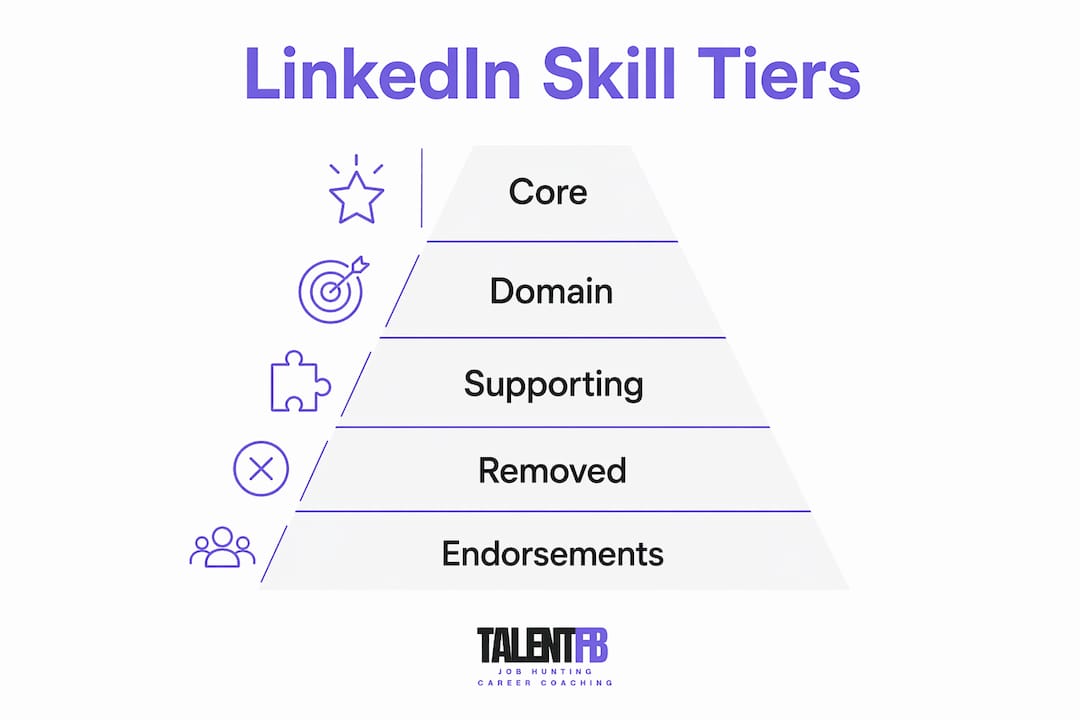
Choosing skills strategically means thinking in three tiers: core skills, domain skills, and supporting skills. Each tier serves a different purpose in your profile’s overall story.
Core skills are your top 3 pinned selections. These should map directly to the title and function of the roles you are pursuing. A VP of Engineering targeting cloud architecture roles should pin “Cloud Infrastructure,” “AWS,” and “Engineering Leadership,” not “Agile” or “Stakeholder Management,” even if those are genuine strengths.
Domain-specific skills fill the next 10 to 15 slots. These establish your depth within a field and signal to recruiters that you are not a generalist. For a fintech product manager, this tier might include “Payments Architecture,” “PCI-DSS Compliance,” “API Product Strategy,” and “Go-to-Market Planning.” These are the skills that separate you from the hundreds of other product managers on the platform.
Supporting and transferable skills round out the remaining 20 to 30 slots. These are real capabilities that add context, such as “Cross-functional Team Leadership,” “OKR Frameworks,” or “Data Analysis.” They should be genuine, but they are not your headline act.
The most reliable method for identifying which skills belong in each tier is analyzing job postings for your target roles. Pull 10 to 15 job descriptions, extract the skills mentioned most frequently, and map them against your actual experience. This process builds what practitioners call a “target-skill set,” a list calibrated to market language rather than personal preference.
Here is a practical framework for segmenting your skills by career level and function:
| Tier | Skill count | Examples (tech executive) | Purpose |
|---|---|---|---|
| Core (pinned) | 3 | Cloud Infrastructure, AWS, Engineering Leadership | Recruiter search visibility |
| Domain-specific | 10 to 15 | Kubernetes, CI/CD, System Design, SRE | Establish deep expertise |
| Supporting | 20 to 30 | OKR Frameworks, Hiring, Budget Management | Add context and breadth |
| Avoid | 0 | Communication, Teamwork, Microsoft Office | Dilute profile signal |
Skills to remove or never add include basic software proficiency (Excel, PowerPoint), vague soft skills without context, and anything you cannot speak to confidently in an interview. Every skill on your profile is a potential interview topic.
Step-by-step method to audit and optimize your LinkedIn skills section
A skills audit is not a one-time task. It is a quarterly discipline for anyone serious about career advancement. Here is the process TalentFB recommends to senior professionals going through a role transition or proactive career positioning.
- Collect 10 to 15 job postings for your target roles. Use LinkedIn Jobs, and filter by seniority level and geography. Copy the full job descriptions into a document.
- Extract the most frequently mentioned skills. Look for skills that appear in at least 5 of the 10 postings. These are your non-negotiables. Tools like Google Docs or even a simple spreadsheet work fine for this.
- Map each extracted skill to your actual experience. Be honest. If a skill appears in 8 job postings but you have only surface-level exposure, place it in your supporting tier, not your core tier.
- Update your pinned top 3 skills to reflect the language used in those job postings. Exact keyword matching matters because LinkedIn’s search algorithm reads your profile text literally.
- Remove skills that no longer reflect your current level or direction. Outdated pinned skills after a role change reduce recruiter matches due to keyword mismatches. This is one of the most common and costly profile errors.
- Request endorsements strategically. Ask three to five colleagues or managers to endorse your top 5 skills specifically. Focused endorsements on key skills improve search ranking more than a broad spread of single endorsements across 40 skills.
- Embed your top skills in your profile text. Your About section, headline, and job experience descriptions should all reference your core and domain skills naturally. Recruiter search filters scan the entire profile, not just the Skills section.
Pro Tip: Set a calendar reminder every 90 days to review your pinned skills. If you have changed roles, completed a major project, or shifted your career focus, your pinned skills should reflect that shift immediately. Recruiters searching for your next role need to find you with current, relevant language.
For senior tech professionals, the LinkedIn networking advantages that come from a well-optimized skills section compound over time. Each endorsement, each keyword match, and each skill update builds a profile that works for you around the clock.
Common mistakes that quietly kill your LinkedIn skills section
Most professionals set up their skills section once and forget it. That passive approach costs real opportunities. Here are the pitfalls that consistently appear across poorly performing profiles.
- Leaving pinned skills outdated after a role change. This is the single most common error. A Director of Marketing who transitions into a Chief Revenue Officer role but keeps “Content Strategy” and “SEO” pinned will not surface in CRO searches. The fix takes two minutes and can change your recruiter inbound volume dramatically.
- Padding the list with unverifiable soft skills. “Creative thinking,” “adaptability,” and “passion for innovation” tell a recruiter nothing and signal that you ran out of real skills to list. Every slot is valuable real estate. Use it for something specific.
- Spreading endorsements too thin. Having 50 skills each with 2 endorsements is far less effective than having 15 skills with 10 to 15 endorsements each. Concentrated endorsement density on your core skills signals credibility to both recruiters and the algorithm.
- Treating the Skills section as isolated. Skills listed only in the Skills section carry less weight than skills that also appear in your headline, About section, and job descriptions. LinkedIn’s recruiter search indexes the full profile, so repetition across sections reinforces your relevance score.
- Over-padding to hit 50. Adding skills just to reach the maximum limit reduces your perceived focus. A recruiter scanning a profile with 50 skills including “Typing” and “Email Communication” will question the judgment behind the rest of the list.
The underlying principle across all these mistakes is the same: your skills section is a professional argument, not a brainstorm. Every item on the list should be there because it serves your career goals, not because it fills a slot.
What I have learned after 15 years inside the hiring room
After spending 15 years evaluating candidates across tech, fintech, adtech, gaming, and maritime-tech in APAC, I can tell you with confidence that the skills section is one of the most underused levers on LinkedIn. Most senior professionals either ignore it or treat it as an afterthought after writing their headline and About section.
The moment I started advising clients to pin their top 3 skills with precision, the recruiter inbound messages increased noticeably within weeks. Not because LinkedIn suddenly changed its algorithm, but because those profiles finally spoke the exact language the recruiters were searching for. One VP of Product I worked with had “Product Management” pinned as her top skill for three years. We changed it to “B2B SaaS Product Strategy” and her profile views doubled in 30 days. That is the power of specificity.
My honest recommendation is this: do not obsess over reaching 50 skills. Focus on getting your top 10 to 15 skills absolutely right, with strong endorsements and consistent keyword presence across your full profile. The remaining 20 to 30 skills are supporting cast. They matter, but they are not the reason a recruiter clicks your name. You can explore more on building leadership presence through your full profile, not just the skills section.
The professionals who treat their LinkedIn profile as a living document, updating it with each career milestone and each new target role, are the ones who attract opportunities rather than chase them. That is the mindset shift worth making.
— Frederic Bonifassy
Ready to turn your LinkedIn profile into a career asset?
Your skills section is one piece of a larger profile optimization picture. For senior tech professionals and executives, getting every section right, from your headline to your featured posts, is what separates a profile that generates recruiter interest from one that sits invisible in search results.
TalentFB works with Directors, VPs, and Senior Managers across APAC to build LinkedIn profiles that attract the right opportunities within 90 days. The career coaching guide for tech executives covers skills optimization, profile branding, and targeted outreach in a structured, AI-supported system. If you want a profile that works while you sleep, the executive profile optimization program is the place to start. Over 350 professionals have already made the shift.
FAQ
How many skills should you have on LinkedIn?
Most professionals should aim for 20 to 50 skills, with mid-career and senior professionals targeting 35 to 50. The key is that every skill reflects genuine expertise aligned with your target roles.
What are the best skills to showcase on LinkedIn?
The best skills are role-specific, verifiable, and match the language used in your target job postings. For tech executives, examples include “Cloud Architecture,” “P&L Management,” “Engineering Leadership,” and “Product Strategy.”
How many endorsements do you need on LinkedIn?
An endorsement count of 10 to 15 per key skill creates the strongest search impact. Concentrating endorsements on your top 5 to 10 skills is more effective than spreading them thinly across 40 or 50 skills.
Which skills attract recruiters on LinkedIn?
Recruiters filter primarily on your top 3 pinned skills, so those positions carry the most weight. Skills that match exact keywords in job descriptions for your target roles will surface your profile most consistently in recruiter searches.
How often should you update your LinkedIn skills?
Review and update your pinned skills every 90 days, or immediately after a role change, a major project completion, or a shift in your career direction. Outdated pinned skills are one of the leading causes of poor recruiter match rates.