TL;DR:
- A LinkedIn connection workflow is a repeatable process for targeting, engaging, and connecting with the right professionals. Building a solid profile, organizing prospects, and pacing outreach with automation helps prevent restrictions while increasing acceptance. Personalized, content-based engagement nurtures long-term relationships effectively.
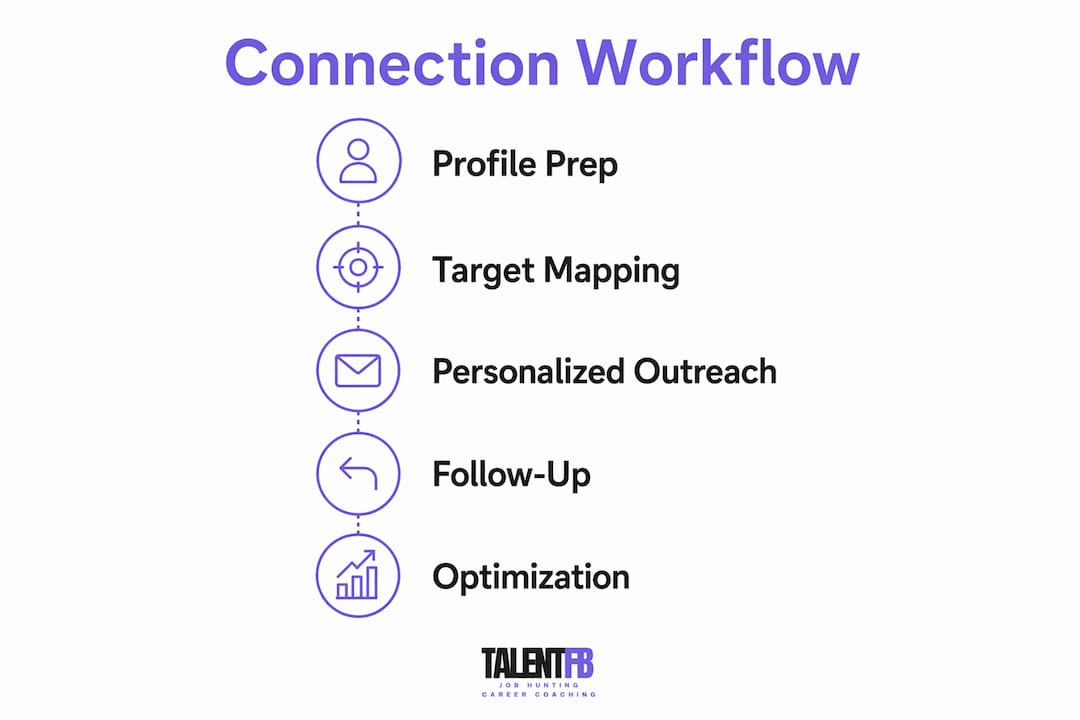
A LinkedIn connection workflow is a structured, repeatable process for identifying, engaging, and connecting with the right professionals on LinkedIn. Without one, most outreach is random and forgettable. With one, you build a network that actually opens doors. LinkedIn limits connection requests to approximately 100 per week, scaling up to 150–200 for high-trust accounts. That constraint forces you to be deliberate. Every request you send is a choice, and a well-designed workflow makes sure those choices compound into real relationships over time.
What does a strong LinkedIn connection workflow require before you start?
The biggest mistake professionals make is jumping straight into outreach before their foundation is solid. Your LinkedIn profile is the first thing a prospect sees after receiving your request. If it looks incomplete or generic, even a warm, personalized note will not convert. Start by optimizing your profile so it clearly communicates your value, your focus, and who you serve.

Once your profile is ready, build your target map. Effective networkers organize prospects into a 200–350 person list segmented by three tiers: decision-makers, influencers, and connectors. Decision-makers are the people who hire or buy. Influencers shape opinion in your space. Connectors introduce you to both. Segmenting this way keeps your outreach focused on the relationships that matter most.
The third prerequisite is choosing the right tools and pacing approach. Automation can help you scale, but only if it mimics natural human behavior. Automated workflows should ramp up slowly and randomize action timing to avoid triggering LinkedIn’s restriction systems. New or recently inactive accounts should start at 10–15 requests per day and build from there.
| Preparation step | What to do | Why it matters |
|---|---|---|
| Profile audit | Update headline, summary, and featured section | First impression before they accept |
| Target mapping | Build a 200–350 person segmented list | Focuses effort on high-value prospects |
| Tool selection | Choose tools that randomize timing and pause on replies | Protects account from restrictions |
| Account warming | Start slow, increase volume over 2–3 weeks | Builds trust with LinkedIn’s algorithm |
Pro Tip: Check your Social Selling Index (SSI) score in LinkedIn Sales Navigator before scaling. Accounts with higher SSI scores can safely send up to 200 requests per week without triggering flags.
How to execute a step-by-step LinkedIn outreach process with personalization
The most effective approach is what practitioners call a signal-based workflow. Instead of sending cold requests to strangers, you engage with a prospect’s content first. This is sometimes called the “Polite Guest” method. This sequence increases acceptance likelihood by making your invitation feel warm rather than cold. Here is how to run it:
- Identify your prospect from your segmented target map. Confirm they are active on LinkedIn by checking recent posts or comments.
- View their profile intentionally. LinkedIn notifies them. This plants a seed of familiarity before you say a word.
- Engage with their content two or three times over the following week. Leave a thoughtful comment, not just a like. Reference a specific point they made.
- Send the connection request after those interactions. You are no longer a stranger at this point.
- Write a personalized note of up to 300 characters. Reference something specific: a post they wrote, a shared connection, or a relevant professional observation.
- Wait for acceptance before sending any follow-up message. Never pitch in the connection note itself.
Personalizing connection notes with context like shared connections or recent achievements improves acceptance rates by over 50%. That is not a small margin. It is the difference between a workflow that builds your network and one that burns your reputation.
The best connection notes follow a three-part structure: a specific reason for reaching out, a relevant observation about their role or work, and a soft close with no sales ask. Keep it under 300 characters and read it aloud before sending. If it sounds like a template, rewrite it.
| Workflow type | Engagement before request | Personalization level | Acceptance rate |
|---|---|---|---|
| Cold outreach | None | Low (generic note or blank) | Low |
| Signal-based | 2–3 content interactions over 1 week | High (specific reference) | High |
| Automated layering | Scheduled profile view + timed request | Medium (semi-personalized) | Medium |
Pro Tip: Send your daily requests in the morning on weekdays. Professionals check LinkedIn most actively between 8 AM and 10 AM. Timing your requests to land during active hours increases the chance of a same-day acceptance.
The recommended daily send pace is 15–20 requests per day. Hitting your weekly limit in a single session is one of the fastest ways to trigger a restriction. Spread your activity across five days and vary the exact number each day to mimic natural behavior.
What are effective follow-up strategies after a connection is accepted?
Accepting a connection request is a small act of trust. How you respond in the next 24 hours determines whether that trust grows or disappears. Follow-up messaging within 24 hours post-acceptance greatly increases engagement, especially when the approach is low-friction and non-sales.
Your first message should thank them for connecting and add a small piece of value. Share a relevant article, reference something they recently posted, or ask a single thoughtful question about their work. Do not ask for a call. Do not pitch your services. The goal of message one is simply to confirm you are a real person worth talking to.
A practical follow-up sequence looks like this:
- Day 1 (post-acceptance): Thank them, add value, no ask. Keep it under three sentences.
- Day 4–7: Send a second message referencing a trigger, such as a post they published, an event they attended, or a role change on their profile.
- Day 14–21: If no reply, send one final message with a different angle or a direct, low-pressure question. After this, move on.
The most effective follow-up uses a “thank you plus value” format. Providing insights or asking thoughtful questions increases long-term engagement far more than any sales pitch. Professionals remember who made them think, not who asked for their time.
Watch for engagement triggers that signal a good moment to reach out again. A new post, a job change, a comment on shared content, or an event attendance are all natural conversation starters. These moments make your outreach feel timely rather than random.
Pro Tip: Use LinkedIn’s notification feed to monitor your connections’ activity. When someone you have connected with publishes a post or celebrates a milestone, that is your cue to re-engage with a genuine comment before sending any direct message.
For a deeper look at building lasting connections, the principles of patience and relevance apply equally to LinkedIn and every other professional context.
What are common challenges when optimizing LinkedIn connection workflows?
Volume-based outreach is the most common failure mode. Mass outreach produces poor outcomes compared to aligning your profile, network, and content to attract the right audience. Sending 100 generic requests a week feels productive. It rarely is.
Account restrictions are the second major challenge. LinkedIn watches for sudden spikes in activity, repeated session logins from new devices, and high volumes of unanswered requests. Ramp-up of LinkedIn activity is non-negotiable. Sudden spikes trigger restrictions, while gradual increases build account trust over time.
Here are the warning signs to watch for and how to respond:
- Forced logouts or authentication prompts: Slow down immediately. Reduce daily volume by 50% for one week.
- Low acceptance rates (below 20%): Audit your target list and your connection notes. The problem is usually poor targeting or a generic message.
- No replies after acceptance: Your follow-up sequence needs work. Test a different opening line or value offer.
- “You may know” suggestions drying up: LinkedIn may be quietly limiting your reach. Check your SSI score and review recent activity patterns.
Monitoring session friction, such as forced logouts or authentication prompts, is the clearest early signal that your workflow is moving too fast. Adjust pacing before LinkedIn acts, not after. The cost of a restricted account is far higher than the cost of slowing down for a week.
Signal-based networking with behavioral cues significantly improves warm outreach effectiveness compared to scraping cold lists. If your acceptance rate is low, the answer is almost never to send more requests. It is to send better ones to more relevant people.
Refining your target map every month keeps your outreach sharp. Remove prospects who have gone inactive, add new ones based on recent content or role changes, and re-evaluate which tier each person belongs in. A living target list outperforms a static one every time.
What I have learned after 15 years watching LinkedIn outreach succeed and fail
After spending 15 years inside hiring rooms across tech, fintech, and adtech in APAC, I have seen every version of LinkedIn outreach. The professionals who build genuinely useful networks share one trait: they treat every connection request as the beginning of a relationship, not the beginning of a sales funnel.
The biggest shift I recommend is moving away from thinking about volume entirely. I have watched executives send 200 requests a week and build nothing. I have also watched a VP of Engineering send 20 carefully chosen requests a month and land three board advisor roles in a year. The math of quality always beats the math of quantity on LinkedIn.
What actually works in 2026 is patience combined with digital awareness. Read your prospects’ content before you reach out. Notice what they care about. Reference it specifically. That one habit, more than any tool or automation, is what separates a B2B LinkedIn engagement strategy that builds real pipeline from one that generates noise.
Automation has a place, but only after you have validated your messaging manually. Test your connection notes and follow-up sequences by hand first. Once you know what converts, then automate the mechanics while keeping the words human. The moment your messages start sounding like a sequence, your acceptance rate will tell you.
— Frederic Bonifassy
How TalentFB helps professionals build networks that work
Building a LinkedIn network that actually produces career opportunities or attracts top talent requires more than a good workflow. It requires a profile that earns trust on first view and a positioning strategy that makes the right people want to connect with you.
TalentFB works with senior tech professionals and business leaders across APAC to build exactly that. Whether you are a Director or VP looking to land your next role within 90 days, or a CEO wanting to attract top talent without paying executive search fees, the approach starts with your LinkedIn presence. The career coaching guide for tech executives walks through the full system, from profile positioning to outreach to offer negotiation. If you want your LinkedIn to work harder for you, that is the place to start. You can also explore the online visibility checklist to audit your current presence before making any changes.
FAQ
What is a LinkedIn connection workflow?
A LinkedIn connection workflow is a structured process for identifying target prospects, engaging with their content, sending personalized connection requests, and following up after acceptance. It replaces random outreach with a repeatable system that builds trust at every step.
How many LinkedIn connection requests can I send per week?
LinkedIn limits connection requests to approximately 100 per week for standard accounts, with high-trust accounts able to send up to 150–200 weekly. A recommended daily pace of 15–20 requests spread across weekdays reduces the risk of account restrictions.
Does personalizing connection notes really make a difference?
Personalizing connection notes with specific context improves acceptance rates by over 50% compared to blank or generic requests. A note that references a shared connection, a recent post, or a relevant professional observation converts significantly better than a default message.
How soon should I follow up after a connection is accepted?
Follow up within 24 hours of acceptance using a “thank you plus value” message with no sales ask. Subsequent messages spaced 3–7 days apart, tied to engagement triggers like new posts or role changes, build rapport without pressure.
What causes LinkedIn to restrict my outreach activity?
Sudden spikes in connection requests, repeated logins from new devices, and high volumes of unanswered requests all trigger LinkedIn’s restriction systems. Gradual ramp-up of activity over 2–3 weeks, combined with randomized timing, keeps your account in good standing.